How to Install OpenClaw with Installation Requirements
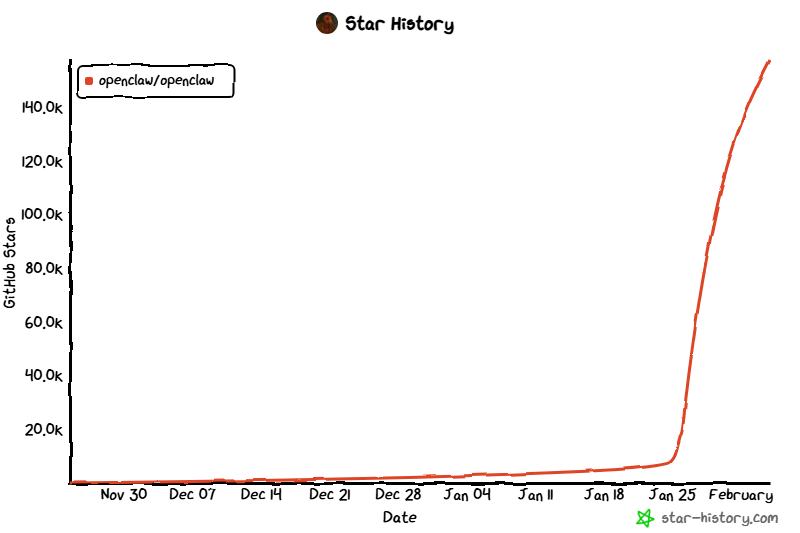
OpenClaw is an open-source, autonomous personal AI assistant (often described as an “AI agent” or “agent platform”) that runs locally on your own hardware. Released in late 2025 (initially as Clawdbot, briefly Moltbot due to a trademark issue, then rebranded to OpenClaw in early 2026), it was created by developer Peter Steinberger and has exploded in popularity with massive GitHub stars and viral attention.
It stands out from typical chatbots because it’s designed to actually perform actions — things like clearing your inbox, sending emails, managing your calendar, checking you in for flights, summarizing info, running commands, and handling autonomous tasks across your apps. It integrates deeply with messaging platforms you already use (WhatsApp, Telegram, Slack, Discord, Signal, iMessage, Microsoft Teams, Google Chat, and more) so you interact with it via chat rather than a separate interface. Being fully open-source and self-hosted, your data stays on your devices/infrastructure (laptop, home server, VPS, etc.), with no cloud dependency for the core runtime.
It’s often called “the AI that actually does things” and has a fun lobster/space-lobster mascot/theme (“the lobster way,” “EXFOLIATE!”).
Installation Requirements
Installation is straightforward and Node.js-based (it’s primarily a Node runtime project). Note: Always consult the official repository or OpenClaw.ai for the most up-to-date instructions, as requirements can change quickly.
Here is a reliable installation method that works for many users:
- Runtime: Node.js ≥ 22 is required.
- Install Command:
npm install -g openclaw@latest # or: pnpm add -g openclaw@latest - Setup:
openclaw onboard --install-daemon
Other Details:
- Quick install: Some users use the one-liner
curl -fsSL https://openclaw.ai/install.sh | bash. - Docker: Very popular for isolation if you don’t want to install globally.
- OS notes: Works on macOS, Linux; for Windows, WSL2 (Ubuntu recommended) is strongly preferred over native Windows due to better compatibility.
- Integration setup: After install, you configure API keys for LLMs (e.g., OpenAI, Claude, local models), connect messaging accounts, and set up skills/tools.
Is it huge? Does it require a lot of space?
- Disk space: No, the core OpenClaw software itself is not huge. The repo and installed files are relatively compact (typical Node project size, likely under a few hundred MB including dependencies). It doesn’t ship with massive models or datasets.
- The space factor: Comes from what you choose for the LLM backend:
- If using cloud APIs (OpenAI, Anthropic Claude, Grok, etc.) → almost no extra local space needed.
- If running local models (e.g., via Ollama, LM Studio, or built-in support) → then yes, large language models can take 5–50+ GB depending on size (e.g., 7B–70B parameter models).
Overall, the base install is lightweight; any “huge” aspect is optional and tied to local LLM usage.
Can it run on an ordinary laptop with less than 16GB RAM?
Yes working with less than 16GB is entirely possible. The core agent software is efficient, and the heavy lifting depends on how you configure it.
- Minimum viable (4GB): For basic testing or very light usage with cloud APIs, 4GB can work, but it’s often considered fragile. You might encounter stability issues if multitasking heavily.
- Recommended starting point (8GB): Many users successfully run OpenClaw on 8GB machines. This is a practical sweet spot for most personal use cases, provided you rely on cloud APIs (OpenAI, Anthropic, etc.) for intelligence.
- Comfortable / Production (16GB+): For a smooth, “set it and forget it” experience where the agent runs 24/7 in the background without worrying about memory pressure, 16GB is the ideal standard.
What about local models? If you plan to run local LLMs (e.g., Llama 3, Mistral) alongside the agent:
- 8GB RAM is tight but doable for very small, quantized models (7B parameters).
- 16GB-32GB+ RAM is often necessary for larger, smarter local models to run at acceptable speeds.
- Most community guides suggest starting with cloud APIs to keep hardware requirements low, then experimenting with local models if you have the hardware for it.
Bottom line
On a typical modern laptop with 16GB RAM, OpenClaw runs well using cloud LLM providers. For fully local/privacy-max mode, stick to smaller models or accept slower performance. Many guides recommend starting with cloud APIs anyway, then experimenting with local if desired. If you’re concerned, Docker setups or a cheap VPS (4–8GB recommended for smooth 24/7 use) are popular alternatives.
For the latest details, check the official site (openclaw.ai), GitHub (github.com/openclaw/openclaw), or their docs (docs.openclaw.ai). It’s still a young project (only weeks/months old as of early 2026), so things evolve quickly. Be cautious with permissions/security — as an agent with tool access, it can do powerful (and risky) things if misconfigured.