Can AI bring images to life? (Part 2: The Google Approach)- Dear Upstairs Neighbors
In Part 1 of this series, I tested Luma Labs’ Dream Machine with a simple picture of bees. The result was… well, let’s call it “biologically creative.” While the AI recognized the insects, it had no understanding of physics. This led to some hilarious, sliding bees that didn’t quite know how wings worked.
That experiment highlighted the limits of “Text-to-Video”. You type a prompt, and you get what you get. But what happens when professional animators and AI researchers team up to solve this?
Recently, Google DeepMind released a behind-the-scenes look at their animated short film, “Dear Upstairs Neighbors,” which premiered at the Sundance Film Festival. Their process reveals exactly what is missing from the one-click tools we use.
Google’s “Dear Upstairs Neighbors”
Unlike my bee experiment where I asked the AI to “move insects realistically” and hoped for the best, the team behind Dear Upstairs Neighbors (including Pixar alum Connie He) knew that relying on luck wouldn’t work for a narrative film.
They wanted a specific, expressionistic style. It needed to look like a moving painting. To achieve this, they couldn’t just rely on a standard model. They had to build new workflows that combined traditional animation skills with Generative AI.
The Workflows: What They Mean for Us
Google’s blog post details three key techniques. Here is what they actually mean for a regular person trying to make video.
1. Fine-Tuning (Teaching the Model Rules)
Google “fine-tuned” their Veo and Imagen models using their own concept art.
- What it means: Imagine you hire an artist, but they have never seen your main character “Ada” before. You would have to describe her every single time you want a drawing. Fine-tuning is like showing the artist a portfolio of Ada first so they learn her face, her clothes, and the specific brushstrokes you like.
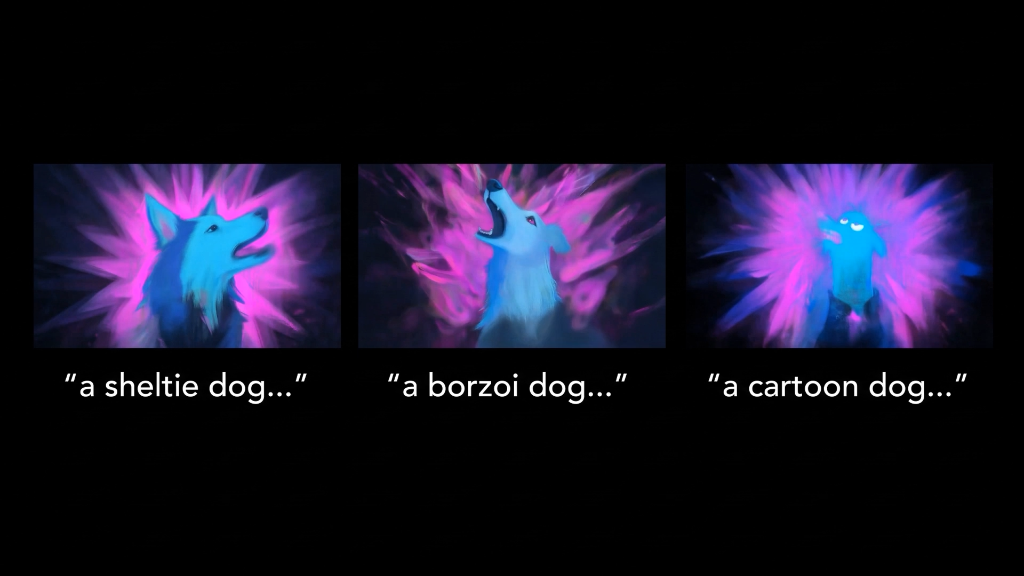 Here is an example of fine-tuning from the blog post By combining fine-tuned Veo models with video-to-video workflows, the team could continuously refine the dog’s appearance and the surrounding artistic flourishes. This approach gave them unparalleled flexibility to experiment with different visual styles.
- Can you do this? Currently, not really. For the average user, tools like Google Veo or Luma are “black boxes.” You cannot pop the hood and teach them your own style yet. This level of control is mostly reserved for enterprise partners or requires technical coding skills with open-source models. For now, we are stuck with the “generic” style the AI was trained on.
2. Video-to-Video (Tracing Paper)
This was the biggest difference from my Luma experiment.
- What it means: Instead of typing “Ada types on a keyboard” and hoping the AI understands rhythm, the animators filmed themselves acting it out or built a blocky, ugly 3D animation first. They fed this rough video into the AI. The AI then acted like a fancy filter. It painted the final, colorful style over the top of their rough movement.
- Can you do this? Yes! This feature is becoming common. It is the bridge between random chaos and control. If you want a character to wave at a specific speed, you film yourself waving and let the AI “skin” you. It turns the AI from a slot machine into a costume department.
3. Localized Refinement (The “Fix-It” Tool)
- What it means: Sometimes the AI generates a perfect 5-second clip, but the character has six fingers on one hand. In my “Part 1” workflow, I would have to delete the video and try again, hoping the next one is better. Localized refinement is different. It allows you to draw a circle around just the hand and say “fix this part only.” It keeps the rest of the video exactly the same.
- Can you do this? This is starting to appear in high-end tools (often called “Inpainting”), but it is still rare in free apps. It is the most critical feature for professionals because it saves hours of wasted work.
Result & Conclusion
The final film looks stunning. It is a seamless blend of 2D aesthetics and 3D consistency. But here is the catch. It wasn’t magic.
Google openly admitted that “none of our final shots were created in a single ‘one-click’ generation.” They had plenty of bloopers where the AI did strange, unpredictable things. The difference was they had the tools to intervene, correct, and guide the AI until it got it right.
So, after looking at the bleeding edge of AI animation, the answer to the question “Can AI bring images to life?” remains the same as in Part 1:
It can Kinda bring images to life but you might not like it’s first attempt.
#google #deepmind #animation #veo #generativeAI
Official Trailer:
Dear Upstairs Neighbors - Blog Post
Read the original breakdown by Google DeepMind detailing how they used fine-tuned Veo and Imagen models to bring this short film to life.
Read on Google BlogDear Upstairs Neighbors - Trailer
Watch the complete official trailer for ‘Dear Upstairs Neighbors’ directly on YouTube.
Watch Trailer