Building a Telegram Bot for Easy Media Uploads to My Blog
In my 100 Posts Later reflection and my article on SveltiaCMS escaping CMS hell, I talked about how I shifted away from a code editor (like VS Code) for managing my website’s content. Switching to SveltiaCMS was a huge step forward because it allowed me to edit posts directly through a user-friendly interface.

But even with the native image pickers and drag-and-drop improvements in SveltiaCMS, managing minor media—like saving a funny meme to my gallery, bookmarking a YouTube video I liked, or uploading an AI-generated portrait—still had a bit of friction.
What’s the absolute fastest, most frictionless way to save an image from your phone? Texting it.
So, I built a Telegram bot that interfaces directly with my GitHub repository using the GitHub REST API and PythonAnywhere.
How It Makes Things Easy
The overarching goal was entirely about reducing friction. By shifting the entire upload process into a messaging app I use daily, the time it takes to see a cool image, save it, and publish it to the gallery folder of my site dropped from opening a browser tab to literally just forwarding a message on my phone.
There’s no longer any need to pull out a laptop. It all happens asynchronously, in the cloud, right from my phone’s keyboard.
Features
1. Interactive Menus for Categorization
When I upload an image to the bot, it replies instantly with an interactive inline menu. I tap a button to specify exactly what kind of image it is: a Meme, an AI Generation, a standard Gallery picture, or just a raw Asset.
If I choose “AI Gen,” it asks me for the model (Gemini, Midjourney, Grok). If I pick “Gallery,” it asks for geographic categories like Rwanda or Ghana.
2. Auto-Generates Jekyll Frontmatter
The bot is fully integrated with my website’s architecture. Once it processes an image, it automatically creates a corresponding Markdown file and fills in the title, date, category, and image link seamlessly based on my text captions and menu selections. Everything is instantly formatted exactly how my CMS expects it.
Here is an example of uploading a meme. The bot automatically commits both the image and the generated markdown directly to the repository:
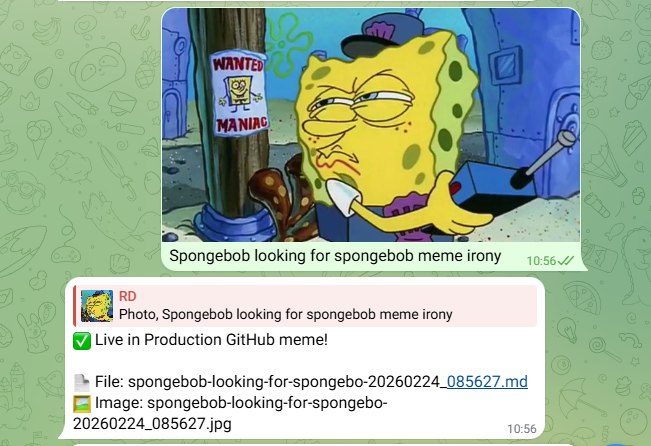
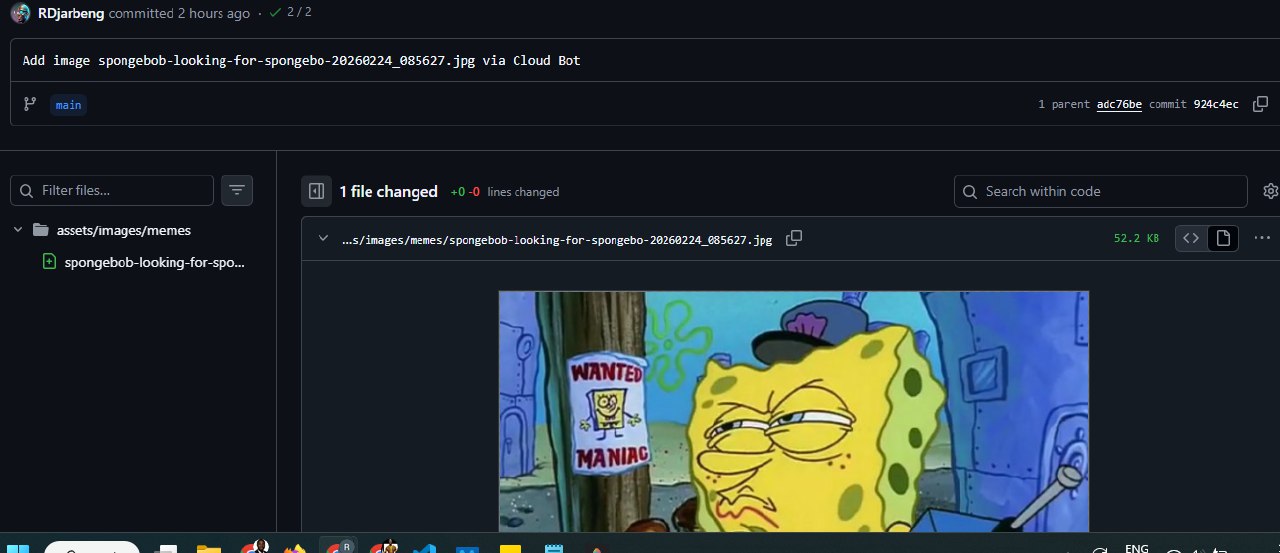
3. Media Groups (Bulk Uploads)
Sometimes I want to upload several images at exactly the same time. If I select a “Media Group” in Telegram and hit send, the bot automatically detects it is a bulk upload. It skips the interactive menus entirely and iterates through every single photo, safely dropping them into an assets/images/grouped remote folder for later use in my SveltiaCMS editor.
4. YouTube Video Summarizer
It isn’t just for images. I can paste a YouTube link, and the bot is smart enough to structure it into a video post. If I type a message along with the YouTube link—for instance, placing a title on the first line and my thoughts on the lines below—the bot cleanly structures that into the Markdown frontmatter so it displays nicely on the Gallery.
5. Instant Cloud Commits
Instead of relying on a local script running on my laptop, the bot is hosted on the cloud via PythonAnywhere. It uses the PyGithub library to convert Telegram files straight into base64 streams and push them directly onto my main branch as live commits. The moment I get a green ✅ Auto-Committed to GitHub! checkmark in Telegram, the GitHub action kicks off and my site builds automatically.
Building this bot removed the one remaining barrier I had to updating the visual and gallery portions of this site: convenience. SveltiaCMS handles the long-form essays, but my Telegram bot now handles all the quick rapid-fire assets, letting me enjoy sharing content straight from my pocket to the open web.
I tweeted about the telegram bot implementation
Added a feature to add media via telegram to my website repo using the Github API and a telegram bot.
— Richard Djarbeng (@DjarbengRichard) February 24, 2026
This makes it super convenient to upload images by texting the bot. I even added a menu to categorize the images. Useful for memes in particular😃 https://t.co/nflC8uVD3T pic.twitter.com/VHGNcOKAp6