100 Posts Later - Lessons Learnt From Building This Blog
Changes Since the Start
Reaching the milestone of 100 website posts is a moment for reflection. What started as a simple platform to share thoughts has grown into a comprehensive collection of technical guides, personal stories, and reviews. It has been about building a system, refining a workflow, and learning to leverage new technologies like AI to enhance creativity. In this post, I’ll share the lessons I’ve learned, the technical hurdles I’ve navigated, and how my approach to content creation has evolved from the first post to the hundredth.
Content Evolution
Started off with short form content, simple drafts with a basic outline, then started improving the content with AI tools (Grok, claude, Gemini). Made more long form content that is more than a 5 minute read. I think these posts allow me to cover more and are more informative from a reader’s perspective. One good example is my post on a decade by decade look at AI which is sitting at 16 min read time. Ironically it is one of the posts that I would have liked to make longer but didn’t have the time to add in all the extra details. If I had my way I could spend days writing about AI and it’s hard to figure out which content to leave out. Because what to write is not just the issue what to leave out is also a big part of it. I must admit it’s a bit painful leaving out a section of a piece you’ve worked on for days because I don’t think it contributes to the story I am currently telling. Now that I am writing this particular post you are reading now, it might actually exceed that record of 16 minutes, but we’ll see.
The downside of the longer posts is that it also takes way longer to write and it’s hard to find the right balance of content to include. If you want to get an example look at the creation time of this post which I started writing in October, 2025 vs whatever time you are reading this post (check the date modified). Obviously I can’t keep spending weeks on a post and I have to find a balance between the amount of content I want to include and the time I want to spend on it. I’ve found that I can’t write a post in less than a week, maybe 3 days if I really push it and I don’t want to write a post in more than a month.
Sometimes, I end up changing a post so much that I’m not quite sure if the final version that was published is what I intended from the start. Especially when I use Gemini as an editor to brainstorm the drafts of posts. If the wording in every paragraph is changed and the sentence structure differs but it’s saying the same thing is it still the same post with different words or a new post with a different idea but similar to the first? It’s giving the vibe of the ship of Theseus so much.
One of the things that has changed is that I mostly include references directly in the post with the link to the external resource. I used to ‘cite’ them in the text and place them at the end of the post, but I felt that this breaks the flow of reading for the web reader and doesn’t usually help them find what they are looking for quickly; they have to scroll through the list of references to find the actual reference before finally clicking to see what they are looking for. On the upside it makes the post more compact. However, one downside to this is that if the reader doesn’t notice that the text they are currently reading (currently displayed in blue) is a link to a reference, it may sound as if I’m just speaking from my personal experience. For personal stuff like that I’ve got the personal section of this website for that. Also sometimes I do a lot of research too before including certain content in a post, reading across many sources and then when I finally mention it in the post I include a link. I feel this doesn’t show the effort put into looking up sources for that particular post when all you see is a link, which the reader may or may not notice.
Post Thumbnails
Thumbnails for the posts have become more detailed with more information about the post highlighted on the thumbnail. I realize that for the posts that feature me in the cover, I have a tendency to strike a pose where I am looking up.

Just like that vegeta video where he’s in the rain and staring up into the sky.

Typical example is the cover image for my personal post on my trip to Uganda where I am looking up at a statue.

Technical Aspects of Building the Website
This section is dedicated to the technical changes I made after the initial setup of the website detailed in my ‘building this personal website’ post.
Got a .com domain
Changed from the long URL rdjarbeng.github.io to rdjarbeng.com.
This is an improvement, easy to memorize and also shows that the website url keeps getting shorter and better. I’ll insert a picture to illustrate this using the spaceX booster engines.
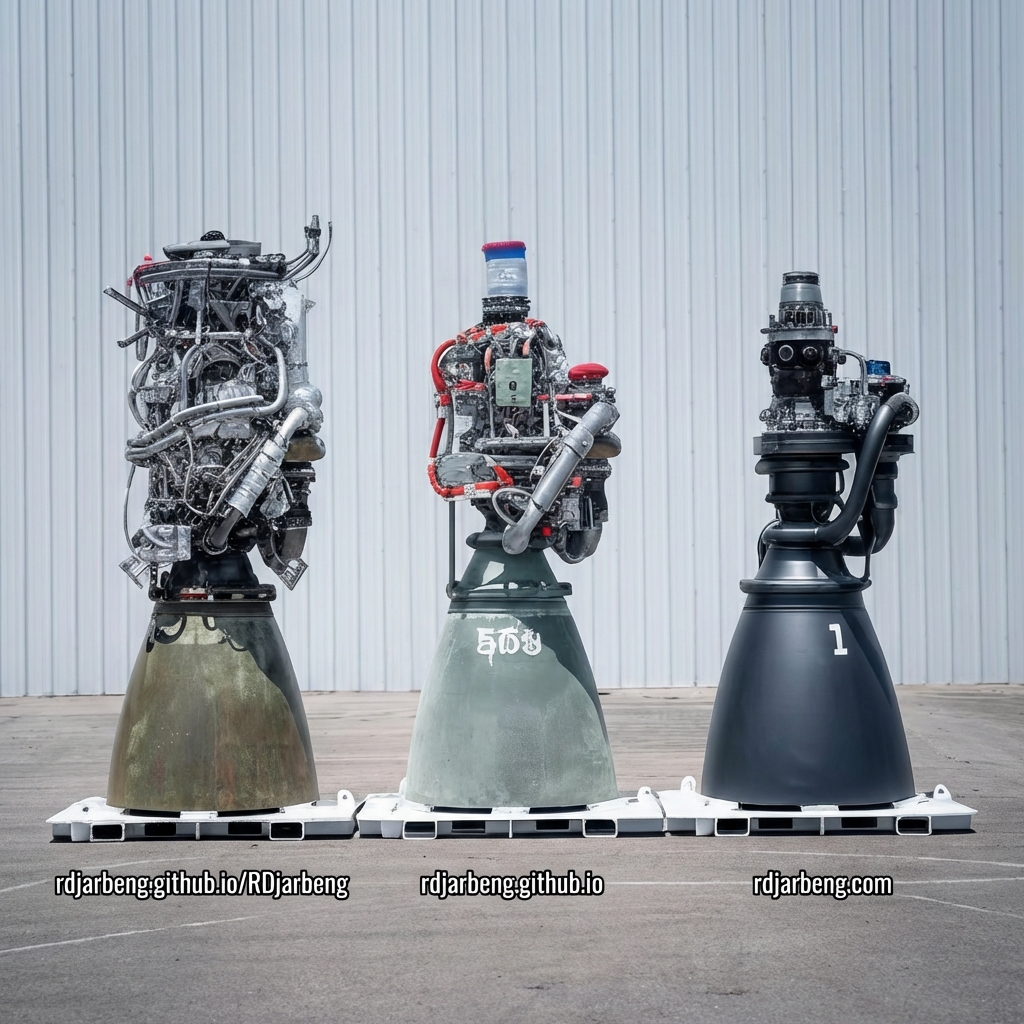
I had an issue before changing to the .com domain, I kept failing to add a sitemap to my website in Google Search Console. However, once I set up the domain, it worked with no code changes. Apparently, Google Search Console is biased against .github.io domains or subdomains in general.
Moved to SveltiaCMS for managing posts.
This change was necessary because adding posts on the website at first felt like a chore and managing different files was just taking too long. The CMS made the addition of posts go from creating and naming different files to just writing a post similar to posting on social media and adding images. By reducing friction when creating posts it really sped up my development process. Also I could think about the code and web content separately now. The biggest improvement for this was that I didn’t have to think of naming files for posts. I could just write the post and it would be automatically added to the website. I also didn’t have to think of naming the files for the images. I could just name the file whatever I wanted and it would be automatically added to the website.
You can see here for yourself my graph of the monthly post frequency and cumulative number of posts since the introduction of SveltiaCMS.
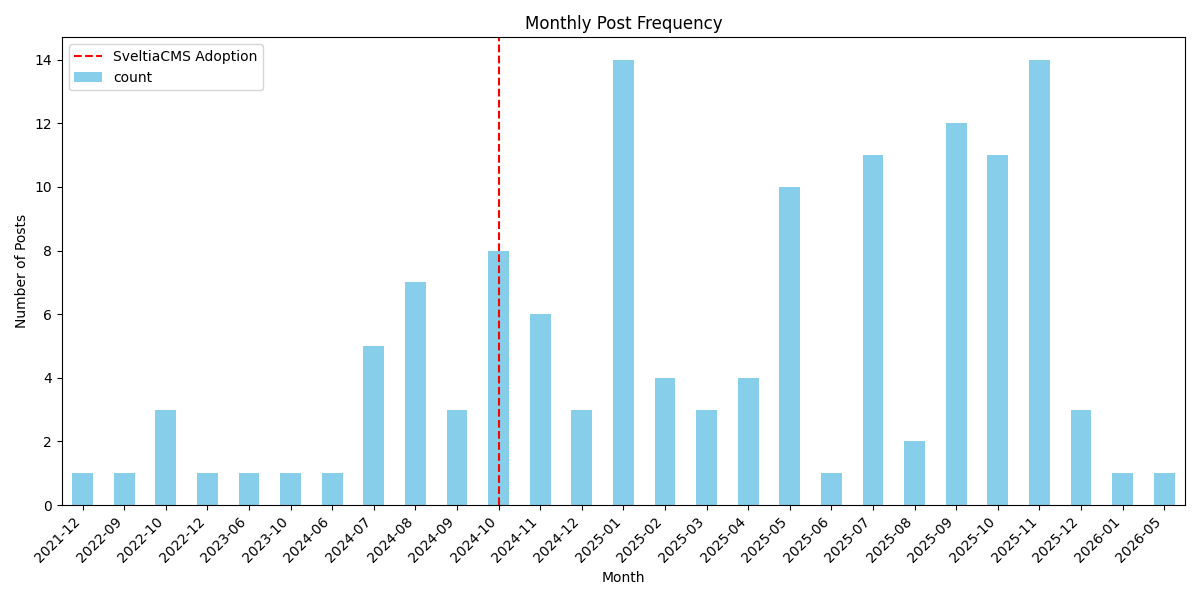
Figure 1: Monthly frequency of blog posts.
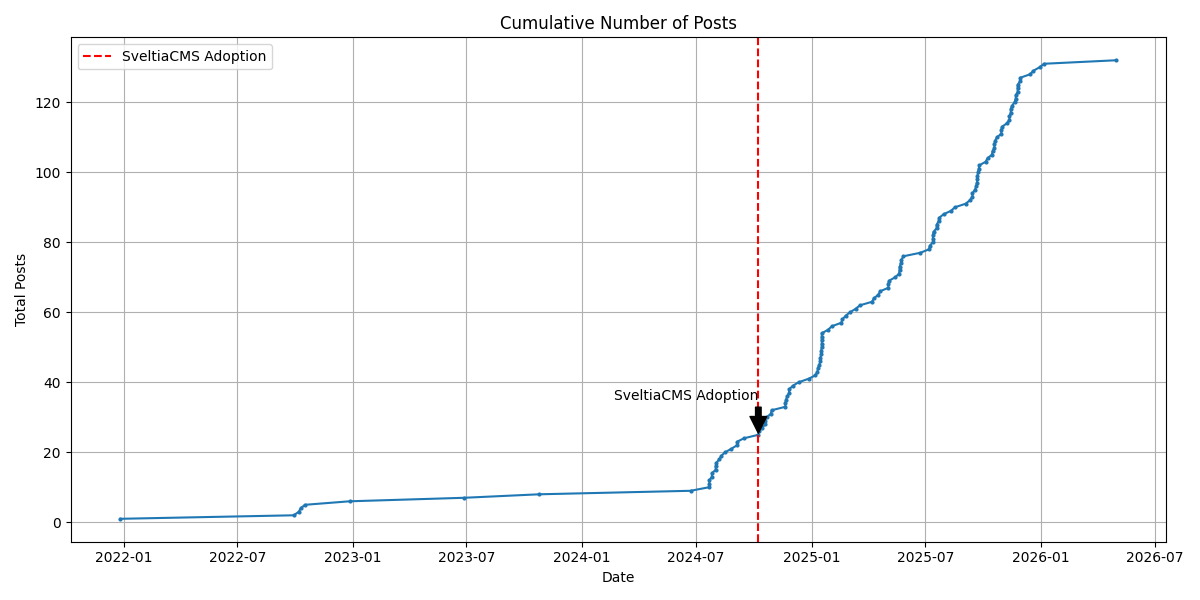
Figure 2: Cumulative number of posts over time, marking the adoption of SveltiaCMS.
Made a series of posts about this if you want to read them, I talk about my experience setting up SveltiaCMS in these posts:
Added website contact form
I added a form for people to contact me on the about page because I felt it wasn’t wise to publish my personal email on the web. Turns out that this website domain also comes with the ability to setup a custom email …@rdjarbeng.com. Nice, very official.
Setup emails ending in @rdjarbeng.com for branding purposes. It also helps me filter emails/contacts related to the site. Very handy.
Lighthouse Performance Metrics
Are we green? Mostly. How long to load? Fast enough, but room for improvement.
| Metric | Value | Status |
|---|---|---|
| First Contentful Paint (FCP) | 1.4 s | 🟢 Good |
| Largest Contentful Paint (LCP) | 5.2 s | 🔴 Poor |
| Total Blocking Time (TBT) | 120 ms | 🟢 Good |
| Cumulative Layout Shift (CLS) | 0 | 🟢 Good |
| Speed Index | 1.8 s | 🟢 Good |
Note: Largest Contentful Paint is taking a hit, likely due to the high quality images I’m using now. A trade-off I’m willing to accept for now.
Personal page
Added a personal page where I discuss non-technical stuff. It’s basically another list of posts just separated from the regular technical posts. It took more than expected to create and link another collection with jekyll that was not posts.
Difficulties with Jekyll
A lot of things were more difficult than expected. Pagination was, still is, a pain in Jekyll. Version 1 and 2 of the jekyll paginate plugin both fail. I even tried leaving the task to an agentic agent to try and figure it out. It tried and failed to get the posts to show up, but got the page navigation working. Then it realized it wasn’t working, tried different workarounds, changed from v1 to v2, back to v1, then back to v2, and eventually gave up. I had to study the code to try and figure out what was wrong with the pagination plugin and ended up creating my own pagination plugin.
SEO - Google Search Console is weird
At one point we had 500+ indexed pages on Google (mostly tags and categories pages)
Later on, I got problems with ‘crawled-not indexed’ and ‘discovered-not indexed’ though on Google Search Console and my number of pages indexed dropped. I blame a Google internal change that happened around July 2025 but I am still not sure if it was that or something else.
Tags and category pages are ranked higher on Google Search instead of the home page or the navigation links. So searching for this website on Google mostly returns tags and categories pages instead of the post pages.
Gallery Feature
I added a gallery page for media content such as cover images for the website and videos hosted on youtube and other platforms. I found I have a lot of media content in the asset folder that was just hidden away in a random post with one mention that was going to waste. Also added iframes to my social media videos since adding the videos directly to the site was consuming too much bandwidth and the video files were also huge giving me trouble whenever I clone the repository. Also it gave me a way to organise my media and memes so I could search them. Sweet.
You might be surprised to hear this, but creating 160 (or even 1,000) small markdown files is actually more efficient for the workflow and the CMS than one giant yaml file, and it had zero noticeable impact on my build speed.
AI Tools
AI tools have been a game changer for me. AI - Gemini pro supercharged my content creation process, thumbnails and image creation for the covers. It also enabled me to create and edit cover images whilst editing posts when using copilot or the chat in the antigravity browser saving me time. The graph of posts over time shows a clear increase in the number of posts after I started using SveltiaCMS but also this increase is also due to the fact that I started using AI tools to create posts and edit them much faster.
Top AI Models Used
Gemini also has Nano-Banana and now with Nano-Banana Pro I can edit pictures and add text that is actually spelled correctly to my images. This saves me time in having to edit and watermark images. Of course the manual thumbnail creation I used to do before has more detail but not every post requires that level of detail. Here for example is my thumbnail for the post on Letsile Tebogo’s epic win at the Olympics (manual thumbnail done with Microsoft Designer) vs my post on the Google vs FFMpeg debate (Generated by Gemini Nano-Banana)

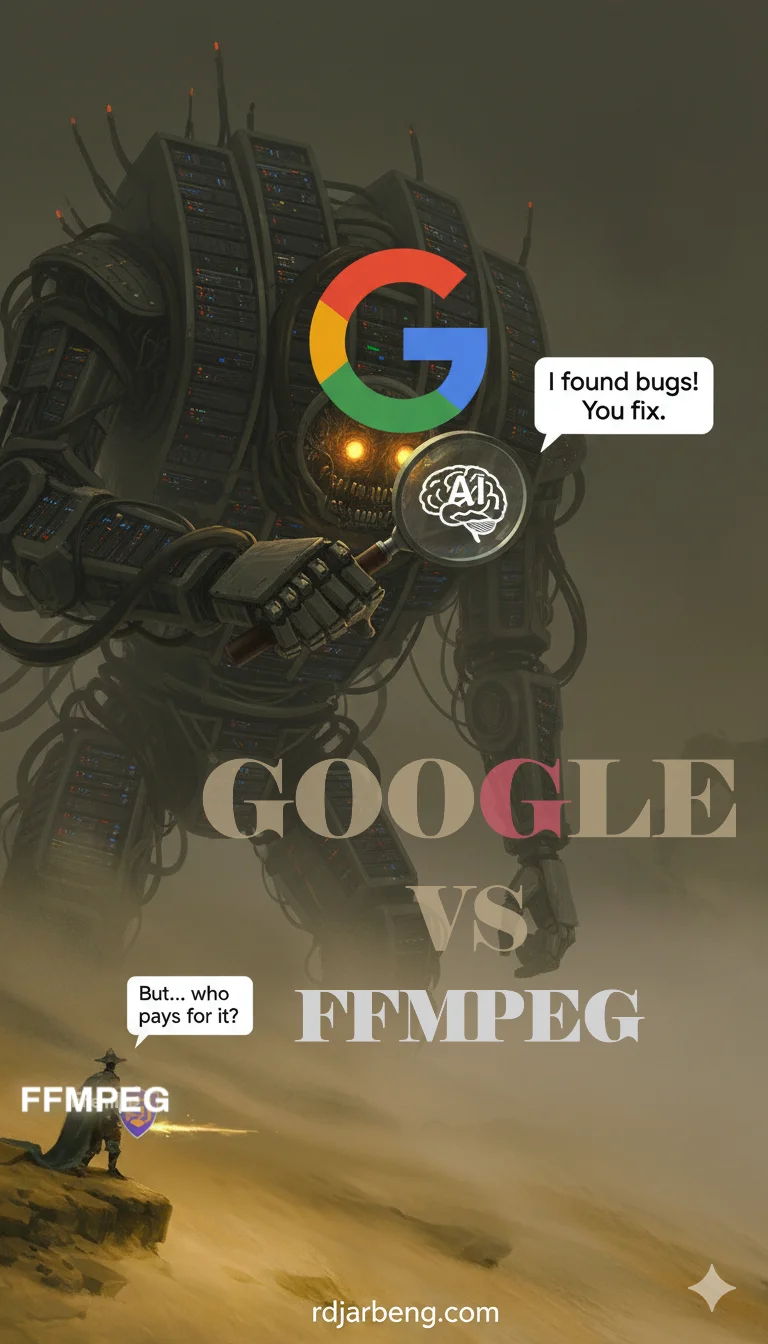
You can be the judge on which one is more detailed and which one you prefer. I just mentioned this to say that the AI cover images take me less time to create.
The problem with gemini however is that sometimes it can produce beautifully written posts that don’t sound like the author (me). So I have to be careful not to lose my voice and flow of thought when editing with gemini by always referencing the earlier drafts.
I mentioned this earlier when speaking about how I can change posts so many times. If I don’t track the original intention of the post I may end up missing the point of the post if I leave the reins to the AI tools.
AI Tools as Writers and Editors
Sometimes I take the output from one model and give it to the other to criticize and work on improvements for the generated output.
Workflow for that AI work flow: Initial draft by me -> 1st draft post* by AI model acting as a co-author -> Review by 2nd model acting as editor -> Update of draft post by me and 2nd AI model -> Final edits by senior Editor, Me
When I mention 1st draft post, it may go through many iterations and is usually the nth version, but it’s usually the version that I find suitable to publish but could use improvement so that’s what is sent to the editor.
Helping Others
Sometimes your work helps others.
- Landing AI post: Highlighted how I was able to notify them about the bug on their website.
- RuRa electricity announcement: Saving costs for electricity.
- Interior AI post: Helped someone create an appropriate layout for their room.
For help posts I have the help category for posts that focus on fixing a bug or some issue I have faced that helped someone.
Lessons in Content Creation
- Detailed does not always mean informative. Some technical posts here didn’t receive much traffic. Some posts that I thought were just regular posts actually did pretty well. For instance my post about my trip to Uganda had a lot of interest even from my friends who were Ugandans and I received a lot of messages when I posted about it. It’s funny because I didn’t really consider it as a post that was going to pick up traction. My whole idea was to tell a story about my experience. I didn’t really think I was writing a post; the whole premise of the post was, ‘See what happened was…’
- Adding thumbnails of posts is good, even if they take time to make.
- Writing takes time, even with AI. Sometimes AI is double work because I have to write drafts, write prompts, edit the AI output, edit my prompts, make minor tweaks, revert changes and scan the posts many times again with reference to the original draft to make sure no important detail was left out acting as a senior editor to make sure everything is set before signing off on a publications. Sometimes I wonder if writing everything myself and editing my drafts is not a less tiring approach. Editing with AI does have the advantage of speed but the extra supervision needed almost negates the speed boost. Maybe writing things myself is a better approach but that also takes up much of my time and posts come out slowly.
My conclusion for AI tools is that they are good for generating tags, images, refining titles. Cannot be trusted to create and edit posts from start to finish without supervision. Opinions mine.
Future Improvements
- Homepage layout: Homepage apparently is not very informative, according to Google. Been thinking of improving the homepage structure to reflect the different categories. I find that seeing a post on finance, then next another on air quality then another about AI spoils the experience. What are the chances that a user will be interested in all three yet they are presented in order on the site. So if you look at it like a recommendation algorithm the closely related items should be grouped into a place where the user can browse their interests without navigating other posts which they have little interest in. I should think this is also good for SEO but I haven’t verified this.
- About page: Does not indicate a contact page at first glance.
- Tags pages: Get more attention than posts on Google.
- Getting guest authors: I actually got my first author to make a post on January 5th, 2026 with the post on the Ghana Stock Exchange located here.
- Improving backlinks: Need more links from other sites pointing to rdjarbeng.com
Best Performing Posts
Trip to Uganda. This post got a lot of attention.
My Personal Favorites
Top AI Models Summary
As discussed in the AI Tools section, I use AI for writing, editing, and thumbnail generation. Here is a breakdown of my top AI models and how I use them:
Grok
Good for refining text and is able to add current information in the proper context especially for posts where information needed is about current events/trending news. Also good for verifying links but not 100% accurate. I’ve found some links to be dead after Grok assures me they are active. Hopefully it gets better eventually.
Gemini
Does well with image generation especially with the text on images than Grok. Experienced a productivity boost with the launch of Nano-Banana Pro for image generation which also reduced the number of typos in cover images. For text content it’s also able to retain context of long posts and is most likely the one that will be used to edit this post. Other models like Claude and Meta AI have their own strengths but I find Gemini to be the most versatile. Grok for example has the tendency to summarize sections of the post that don’t need to be summarized or leave out important information on long posts. Gemini does this less often.
Claude
I used to edit posts with Claude. It excelled at keeping context and also did not change too many things. If I had to change a particular paragraph alone most likely I would use Claude and specify the rest of the post as context. So Claude was good at quick edits that didn’t disrupt much. But it failed at adding relevant context to posts, adding links and verifying that they were working was also something it could not do at that time, it also used to timeout a lot and I found that I had to revisit a post multiple times over a course of days or weeks everytime it timed out. This friction of going back to posts whenever I ran out of tokens made me eventually stop using it for web posts.
Meta AI
I used Meta AI for the post on Tunde Onakoya’s chess marathon in Times square. I liked the feature where it generated images as you typed allowing you to kind of edit on the fly. However since then I have not used it much, also because when I was in Rwanda it was not available in that Region for some time. It is now available but now, just like Claude, I haven’t really felt a need to go back to it after I stopped using it.