# Building a Telegram Bot for Easy Media Uploads to My Blog
- URL: https://rdjarbeng.com/building-a-telegram-bot-for-easy-media-uploads-to-my-blog/
- Published: 2026-02-24
- Author: Richard Djarbeng
- Series: Building This Blog, part 5
- Tags: Automation, Python, Telegram Bot, GitHub Pages
In my [100 Posts Later](https://rdjarbeng.com/100-posts-later-lessons-learnt-from-building-this-blog/) reflection and my article on [SveltiaCMS escaping CMS hell](https://rdjarbeng.com/my-experience-with-sveltiacms-a-game-changer-for-website-management/), I talked about how I shifted away from a code editor (like VS Code) for managing my website's content. Switching to SveltiaCMS was a huge step forward because it allowed me to edit posts directly through a user-friendly interface.
But even with the native image pickers and drag-and-drop improvements in SveltiaCMS, managing **minor media**—like saving a funny meme to my gallery, bookmarking a YouTube video I liked, or uploading an AI-generated portrait—still had a bit of friction.
What's the absolute fastest, most frictionless way to save an image from your phone? Texting it.
So, I built a Telegram bot that interfaces directly with my GitHub repository using the GitHub REST API and PythonAnywhere.
## How It Makes Things Easy
The overarching goal was entirely about **reducing friction**. By shifting the entire upload process into a messaging app I use daily, the time it takes to see a cool image, save it, and publish it to the gallery folder of my site dropped from opening a browser tab to literally just forwarding a message on my phone.
There's no longer any need to pull out a laptop. It all happens asynchronously, in the cloud, right from my phone's keyboard.
## Features
### 1. Interactive Menus for Categorization
When I upload an image to the bot, it replies instantly with an interactive inline menu. I tap a button to specify exactly what kind of image it is: a Meme, an AI Generation, a standard Gallery picture, or just a raw Asset.
If I choose "AI Gen," it asks me for the model (Gemini, Midjourney, Grok). If I pick "Gallery," it asks for geographic categories like Rwanda or Ghana.
### 2. Auto-Generates Jekyll Frontmatter
The bot is fully integrated with my website's architecture. Once it processes an image, it automatically creates a corresponding Markdown file and fills in the `title`, `date`, `category`, and `image` link seamlessly based on my text captions and menu selections. Everything is instantly formatted exactly how my CMS expects it.
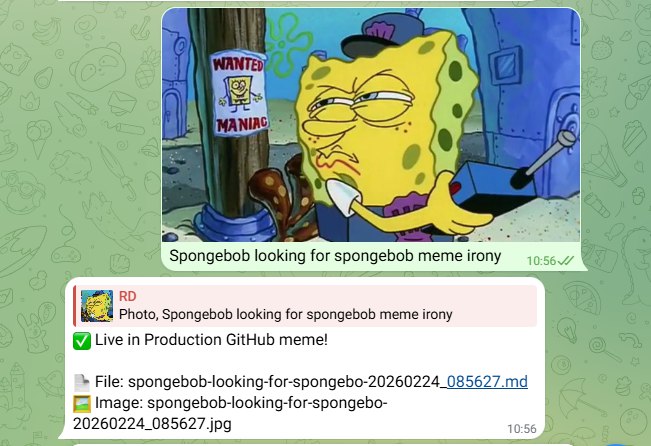
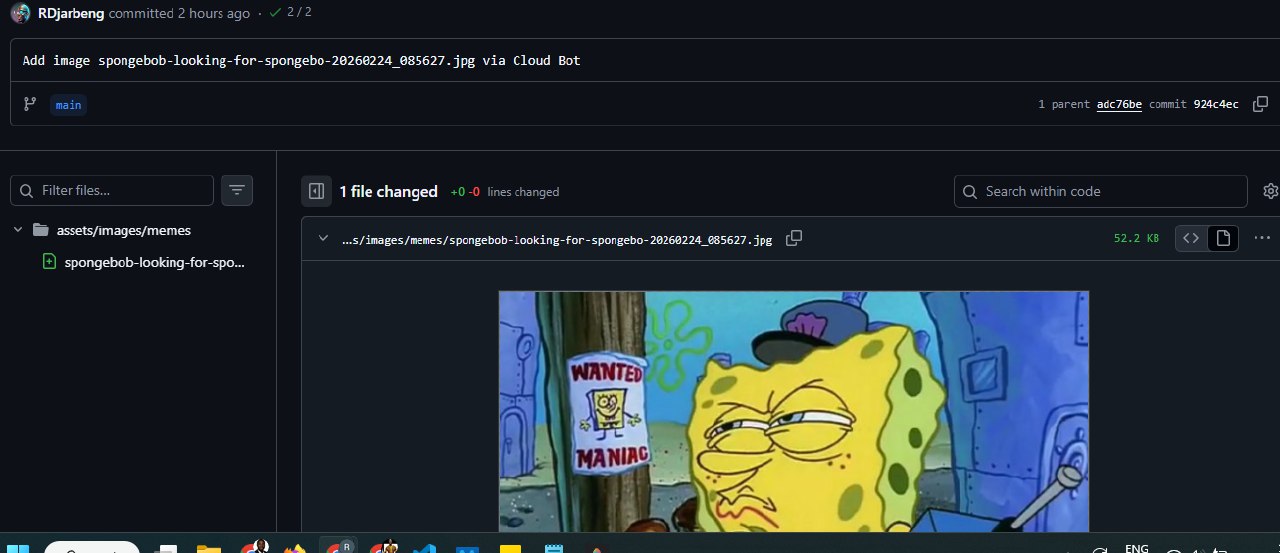
Here is an example of uploading a meme. The bot automatically commits both the image and the generated markdown directly to the repository:
### 3. Media Groups (Bulk Uploads)
Sometimes I want to upload several images at exactly the same time. If I select a "Media Group" in Telegram and hit send, the bot automatically detects it is a bulk upload. It skips the interactive menus entirely and iterates through every single photo, safely dropping them into an `assets/images/grouped` remote folder for later use in my SveltiaCMS editor.
### 4. YouTube Video Summarizer
It isn't just for images. I can paste a YouTube link, and the bot is smart enough to structure it into a video post.
If I type a message along with the YouTube link—for instance, placing a title on the first line and my thoughts on the lines below—the bot cleanly structures that into the Markdown frontmatter so it displays nicely on the Gallery.
### 5. Instant Cloud Commits
Instead of relying on a local script running on my laptop, the bot is hosted on the cloud via PythonAnywhere. It uses the `PyGithub` library to convert Telegram files straight into base64 streams and push them directly onto my `main` branch as live commits. The moment I get a green `✅ Auto-Committed to GitHub!` checkmark in Telegram, the GitHub action kicks off and my site builds automatically.
---
Building this bot removed the one remaining barrier I had to updating the visual and gallery portions of this site: convenience. SveltiaCMS handles the long-form essays, but my Telegram bot now handles all the quick rapid-fire assets, letting me enjoy sharing content straight from my pocket to the open web.
## I tweeted about the telegram bot implementation